Reports Invoices List.
This report gives an overview of all the generated invoices during the current month.
How to access:
The report can be accessed by clicking Reports → Financial Reports → Invoices List in the application menu.
1. Invoices List Layout

2. Invoices List + Payment details Layout
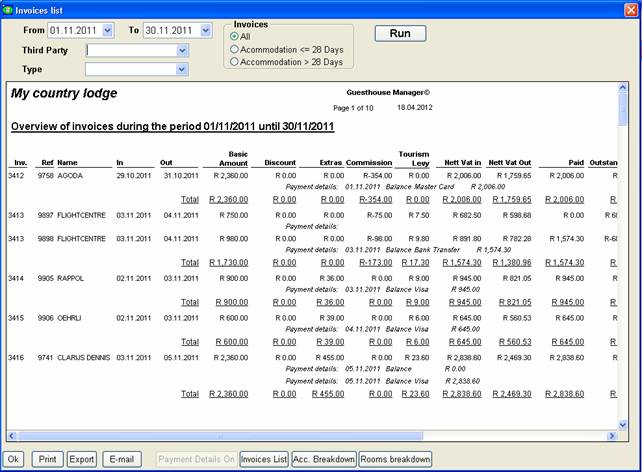
3. Accounting Breakdown Layout

4. Rooms Breakdown layout
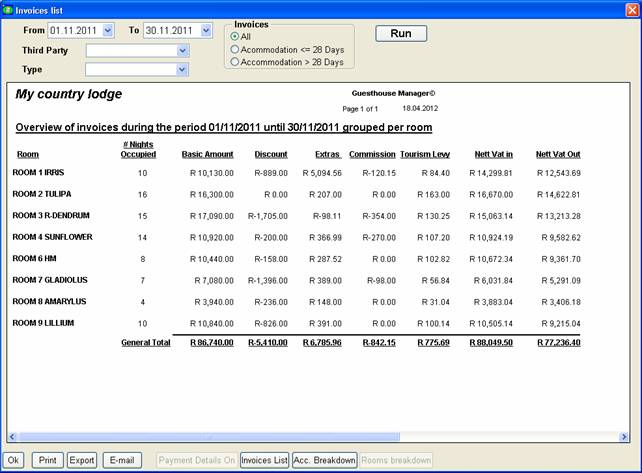
The report shows all the generated invoices during the current month.
The report can also be executed for a different period, select another From or To date and click the Run Button.
The report can also be executed for only 1 Third Party. Select the third party in the Third Party list and click the Run button.
Click the Invoices List button to show layout 1.
Click the Payment Details On button to show layout 2.
Click the Acc. Breakdown button to show layout 3.
Click the Rooms Breakdown button to show layout 4.
To close the window, click Ok at the bottom of the window.
To print the Report, click Print.
To Email the Report, click E-mail.
To Export the Report, click Export.